
DevOps roadmap for beginners in 2024
Learn the essential skills, tools, and best practices to kickstart your DevOps journey

Introduction
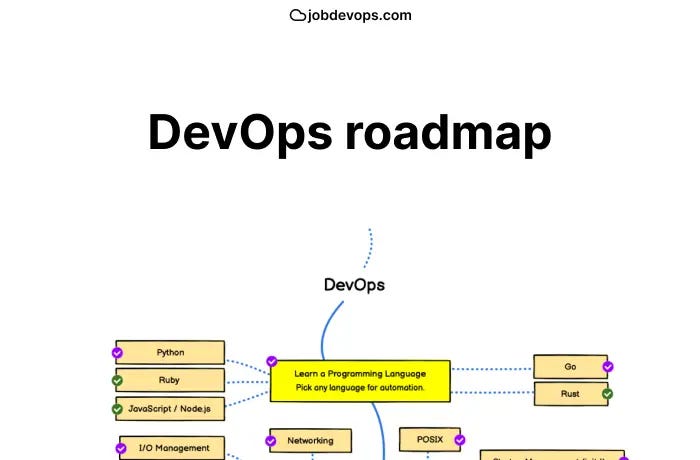
In 2024, the path to mastering DevOps has evolved, integrating more advanced tools, methodologies, and best practices. Whether you're a newcomer to the tech world or a seasoned professional looking to pivot your career, understanding the DevOps roadmap is crucial for staying relevant and competitive. In this blog post we will guide you through essential tools and techniques you need to know and then get the job in DevOps industry on JobDevOps.
DevOps Principles
DevOps is a set of practices aimed at bridging the gap between software development (Dev) and IT operations (Ops). The core principles include:
Collaboration: Promoting effective communication and cooperation between development and operations teams to achieve common goals.
Automation: Implementing automated processes to streamline repetitive tasks, reduce human errors, and speed up the development and deployment cycle.
Continuous Integration (CI): Merging code changes frequently into a shared repository, followed by automated testing to detect issues early.
Continuous Delivery (CD): Ensuring that the software can be released to production at any time by keeping it in a deployable state throughout its lifecycle.
Continuous Deployment: Automating the release of software to production, allowing for faster and more reliable deployment processes.
Software Development Life Cycle (SDLC)
The SDLC is a framework that defines the various stages involved in the development and deployment of software. Understanding these stages is crucial for implementing DevOps practices effectively:
Planning: Identifying requirements, defining the scope, and creating a roadmap for the project.
Coding: Writing the source code for the software application.
Building: Compiling the code and transforming it into an executable format.
Testing: Running automated and manual tests to ensure the software is free of defects and meets the required standards.
Releasing: Preparing the software for deployment by packaging and versioning it.
Deploying: Installing and configuring the software in the target environment, typically through automated deployment pipelines.
Operating: Managing and maintaining the software in the production environment, ensuring its availability and performance.
Monitoring: Continuously observing the software's behavior in production, collecting metrics, and identifying any issues or areas for improvement.
GitHub/GitLab/Bitbucket
These platforms provide hosting for Git repositories and offer additional features to enhance collaboration and integration:
Repository Hosting: Learn how to create and manage repositories, set up access permissions, and handle repository settings.
Collaboration: Understand how to use pull requests (GitHub), merge requests (GitLab), and pull requests (Bitbucket) for code reviews and collaboration. Learn about issues and project management tools provided by these platforms.
CI/CD Integration: Explore how to integrate continuous integration and continuous deployment (CI/CD) pipelines. Understand how to set up automated testing, build, and deployment processes using GitHub Actions, GitLab CI/CD, and Bitbucket Pipelines.
Operating Systems and Scripting
Linux Fundamentals
Linux is a powerful and widely-used operating system, especially in server environments and DevOps workflows. Learning Linux fundamentals is crucial for any aspiring DevOps professional. Key areas to focus on include:
Basic Commands: Understanding essential commands such as
ls,cd,cp,mv,rm, andpwdto navigate and manage the filesystem.File Systems: Learning about different file systems (ext4, xfs, etc.), how to mount and unmount file systems, and manage disk partitions.
Permissions: Understanding file and directory permissions, ownership, and how to modify them using commands like
chmod,chown, andchgrp.Networking: Learning how to configure and troubleshoot network settings, including using commands like
ifconfig,ping,netstat, andss.
Shell Scripting
Shell scripting is a powerful way to automate repetitive tasks and manage system operations efficiently. Gaining proficiency in writing and understanding shell scripts (Bash) involves:
Basics: Learning the syntax and structure of shell scripts, including how to create and run scripts, and understanding variables, loops, and conditional statements.
Automation: Writing scripts to automate routine tasks such as backups, file management, and system monitoring.
Text Processing: Using tools like
awk,sed,grep, andcutto process and manipulate text within scripts.Error Handling: Implementing error checking and handling within scripts to ensure they run smoothly and handle unexpected conditions gracefully.
Python
Python is a versatile programming language that plays a significant role in DevOps workflows. As a beginner, focusing on Python can greatly enhance your ability to automate tasks and streamline operations. Key areas to focus on include:
Automation Scripts: Learn to write scripts that automate repetitive tasks such as file handling, system monitoring, and log management.
Simple Applications: Develop basic applications that can assist in day-to-day operations, such as web scrapers, API clients, and data processing tools.
DevOps Workflows: Use Python to integrate and interact with various DevOps tools and services, such as Jenkins, Docker, and Kubernetes. This includes writing custom plugins, scripts for CI/CD pipelines, and managing infrastructure.
Jenkins
Jenkins is an open-source automation server that is widely used for continuous integration (CI) and continuous delivery (CD). It helps in automating the parts of software development related to building, testing, and deploying, facilitating continuous delivery and continuous integration.
GitLab CI/CD
GitLab CI/CD is a built-in continuous integration and continuous delivery tool, part of the GitLab platform. It provides a seamless integration with the GitLab repository and offers powerful CI/CD capabilities.
CircleCI/Travis CI
CircleCI and Travis CI are popular CI/CD tools known for their simplicity and ease of integration with GitHub and other version control systems. They offer cloud-based CI/CD services that help streamline the build, test, and deployment processes.
Ansible
Ansible is a powerful, open-source automation tool used for configuration management, application deployment, and task automation. It simplifies the management of complex IT environments by providing a simple and efficient way to automate provisioning, configuration, and deployment. Key areas to focus on include:
Basics of Ansible: Learn how to install Ansible and understand its architecture, including the roles of Ansible playbooks, inventories, and modules.
Playbooks: Write and manage Ansible playbooks, which are YAML files that define a series of tasks to be executed on remote hosts. Understand how to create reusable and modular playbooks.
Modules and Roles: Explore Ansible modules, which are units of work that Ansible executes, and roles, which are a way to organize playbooks and other files in a standardized file structure.
Provisioning and Configuration Management: Use Ansible to automate the provisioning of servers, configure systems, deploy applications, and ensure consistency across environments.
Chef/Puppet
Chef and Puppet are two of the most widely used configuration management tools that help manage infrastructure as code (IaC). Both tools allow you to define the desired state of your infrastructure and automatically enforce that state. Key areas to focus on include:
Chef: Chef uses a domain-specific language (DSL) based on Ruby to write configuration "recipes" that describe the desired state of infrastructure resources. Learn how to:
Set Up and Configure Chef: Install and configure the Chef server, workstation, and nodes.
Write and Manage Recipes: Create recipes and cookbooks to automate the deployment and management of infrastructure.
Chef Workflows: Understand Chef workflows, including how to use the Chef development kit (ChefDK) and manage infrastructure changes with version control.
Puppet: Puppet uses a declarative language to define the desired state of infrastructure and manage the configuration of systems. Learn how to:
Set Up and Configure Puppet: Install and configure the Puppet master, agents, and modules.
Write and Manage Manifests: Create manifests and modules to define and enforce system configurations.
Puppet Workflows: Understand Puppet workflows, including how to use Puppet's DSL and manage infrastructure changes with version control.
Comparison and Use Cases: Compare the features and benefits of Chef and Puppet, and understand the scenarios in which each tool excels. Identify the best practices for using these tools to manage infrastructure at scale.
Docker
Docker is a platform that enables developers to automate the deployment of applications inside lightweight, portable containers. Containers encapsulate an application and its dependencies, ensuring that it runs consistently in any environment. Key areas to focus on include:
Docker Fundamentals: Understand the basics of Docker, including how to install Docker on various operating systems, and comprehend the concepts of images, containers, and Dockerfiles.
Creating Dockerfiles: Learn how to write Dockerfiles to define the contents of Docker images. This includes specifying the base image, adding application code, dependencies, and configurations, as well as defining commands to run the application.
Building and Managing Containers: Gain proficiency in building Docker images from Dockerfiles, running containers from these images, managing container lifecycles, and understanding how to use Docker commands to start, stop, and manage containers.
Docker Compose: Explore Docker Compose, a tool for defining and running multi-container Docker applications. Learn how to write docker-compose.yml files to configure multiple services, networks, and volumes, facilitating easy setup of complex environments.
Docker Networking and Storage: Understand Docker's networking model, including bridge networks, overlay networks, and how to manage network communication between containers. Additionally, learn about Docker volumes and bind mounts for persistent storage.
Kubernetes
Kubernetes is a powerful open-source container orchestration platform that automates the deployment, scaling, and management of containerized applications. It helps manage clusters of containers, providing high availability, scalability, and resilience. Key areas to focus on include:
Kubernetes Architecture: Understand the core components of Kubernetes, including the Master Node (which contains the API Server, Scheduler, Controller Manager, and etcd) and the Worker Nodes (which run the containerized applications and contain the Kubelet and Kube Proxy).
Basic Commands: Learn the basic kubectl commands to interact with a Kubernetes cluster, such as creating, updating, and deleting resources like pods, services, and deployments. Master these commands to efficiently manage Kubernetes resources.
Deploying Applications: Explore how to deploy applications on Kubernetes using YAML configuration files. Understand the concepts of pods (the smallest deployable units in Kubernetes), replica sets, deployments, services (to expose your application to the network), and ingress (for managing external access).
Scaling and Monitoring: Learn how to scale applications horizontally by increasing the number of pod replicas. Additionally, discover how to monitor cluster health and application performance using tools like Prometheus (for metrics collection) and Grafana (for data visualization).
Advanced Features: Delve into advanced Kubernetes features such as Helm (a package manager for Kubernetes that simplifies the deployment of complex applications), StatefulSets (for managing stateful applications), and custom resource definitions (CRDs) for extending Kubernetes capabilities.
Security Best Practices: Understand the best practices for securing Kubernetes clusters, including managing access control using RBAC (Role-Based Access Control), securing the API server, using network policies, and managing secrets securely.
Container Orchestration Use Cases
Container orchestration is essential for managing containerized applications in production environments. Understanding the key use cases and scenarios where orchestration platforms like Kubernetes excel is crucial. Key areas to focus on include:
Microservices Architecture: Learn how container orchestration facilitates the deployment, scaling, and management of microservices, ensuring each service can be independently deployed and scaled while maintaining communication between services.
Continuous Deployment: Understand how orchestration platforms integrate with CI/CD pipelines to automate the deployment process, reduce downtime, and ensure consistent application updates, leading to faster and more reliable software releases.
High Availability and Fault Tolerance: Explore how orchestration platforms ensure high availability and fault tolerance by automatically redistributing workloads, restarting failed containers, and ensuring that applications remain available even in the event of failures.
Terraform
Terraform is an open-source tool that allows you to define and provision infrastructure using a high-level configuration language. It enables you to create, update, and manage infrastructure resources in a safe, repeatable way, ensuring that your infrastructure is consistent and version-controlled. Key areas to focus on include:
Basics of Terraform: Understand the core concepts of Terraform, including providers, resources, variables, and state files. Learn how to install Terraform and write basic configuration files.
Writing Configuration Files: Learn how to write Terraform configuration files to define infrastructure resources such as virtual machines, storage, and networking components. Understand how to use modules to organize and reuse configuration code.
Provisioning and Managing Infrastructure: Explore how to use Terraform commands to initialize configurations, apply changes, and destroy resources. Learn how to manage the Terraform state file and handle remote state storage.
Integration with Cloud Providers: Understand how to use Terraform with various cloud providers like AWS, Azure, and Google Cloud. Learn how to authenticate and interact with these providers to manage cloud infrastructure.
Terraform Best Practices: Discover best practices for using Terraform, including code organization, version control, state management, and collaboration in teams.
CloudFormation
AWS CloudFormation is a service that helps you model and set up your Amazon Web Services resources using templates. It automates the provisioning and updating of your AWS infrastructure in a safe and controlled manner. Key areas to focus on include:
Basics of CloudFormation: Learn the core concepts of CloudFormation, including stacks, templates, and change sets. Understand how to write CloudFormation templates using JSON or YAML to define your AWS infrastructure.
Creating and Managing Stacks: Explore how to create, update, and delete CloudFormation stacks. Learn how to use the AWS Management Console, CLI, and SDKs to interact with CloudFormation.
IaC Tools
In addition to Terraform and CloudFormation, several other tools and frameworks are widely used for Infrastructure as Code. Key tools to be familiar with include:
Pulumi: Pulumi allows you to write code in general-purpose languages like JavaScript, TypeScript, Python, and Go to define and manage cloud infrastructure. It provides strong integration with cloud providers and offers a rich set of libraries and tools for infrastructure management.
Ansible: Ansible is not only a configuration management tool but also supports provisioning infrastructure as code. Using playbooks written in YAML, you can automate the setup and configuration of your infrastructure.
Chef and Puppet: Both Chef and Puppet are widely used for configuration management and also support infrastructure as code through their respective DSLs and tools, enabling you to define the desired state of your infrastructure and enforce it consistently.
Prometheus
Prometheus is an open-source systems monitoring and alerting toolkit designed for reliability and scalability. It is particularly well-suited for monitoring dynamic cloud environments and microservices architectures. Key areas to focus on include:
Prometheus Fundamentals: Understand the core concepts of Prometheus, including metrics, time-series databases, and the Prometheus query language (PromQL).
Setting Up Prometheus: Learn how to install and configure Prometheus, including defining scrape targets, configuring alerts, and setting up monitoring for various infrastructure components and applications.
Using PromQL: Gain proficiency in using PromQL to query metrics and create complex queries to gain insights into system performance and behavior.
Grafana
Grafana is an open-source platform for monitoring and observability that integrates with various data sources, including Prometheus, to visualize and analyze metrics. Key areas to focus on include:
ELK Stack
The ELK Stack (Elasticsearch, Logstash, and Kibana) is a powerful set of tools for searching, analyzing, and visualizing log data in real-time. It is widely used for centralized logging and log analytics. Key areas to focus on include:
Monitoring and Logging Tools
Beyond Prometheus, Grafana, and the ELK Stack, there are several other tools and platforms that are widely used for monitoring and logging. Key tools to be familiar with include:
Datadog: Datadog is a cloud monitoring and security platform that provides comprehensive visibility into your infrastructure, applications, and logs. It offers powerful integrations, dashboards, and alerting capabilities.
New Relic: New Relic is a cloud-based observability platform that helps you monitor and manage the performance of your applications and infrastructure. It offers detailed metrics, traces, and log analysis features.
AWS
Amazon Web Services (AWS) is one of the most popular cloud service providers, offering a comprehensive suite of infrastructure and platform services. Key areas to focus on include:
Core Services: Understand the core AWS services such as EC2 (Elastic Compute Cloud) for scalable virtual servers, S3 (Simple Storage Service) for object storage, VPC (Virtual Private Cloud) for networking, RDS (Relational Database Service) for managed databases, and Lambda for serverless computing.
Security and Compliance: Learn about AWS security features, including Identity and Access Management (IAM), encryption, and compliance certifications. Understand how to implement best practices for securing your AWS resources.
Cost Management: Explore AWS cost management tools such as AWS Cost Explorer, budgets, and Reserved Instances to optimize and control your cloud spending.
Automation and Infrastructure as Code: Discover how to use AWS CloudFormation and AWS CDK (Cloud Development Kit) for automating the provisioning and management of AWS infrastructure.
Advanced Services: Delve into advanced AWS services like Machine Learning (SageMaker), Data Analytics (Redshift), and IoT (Internet of Things) to leverage AWS's full potential for various use cases.
Azure
Microsoft Azure is another leading cloud provider that offers a wide range of services for building, deploying, and managing applications. Key areas to focus on include:
Core Services: Learn about Azure's core services such as Virtual Machines (VMs) for scalable compute, Blob Storage for unstructured data, Virtual Network (VNet) for networking, Azure SQL Database for managed relational databases, and Azure Functions for serverless computing.
DevOps and Automation: Explore Azure DevOps services for CI/CD pipelines, version control, and project management. Understand how to use Azure Resource Manager (ARM) templates and Azure Blueprints for infrastructure automation.
Security and Identity: Understand Azure's security features, including Azure Active Directory (Azure AD), role-based access control (RBAC), and encryption. Learn best practices for securing Azure resources.
Monitoring and Management: Discover tools like Azure Monitor for monitoring and diagnostics, Azure Security Center for threat protection, and Azure Policy for governance and compliance.
Integration Services: Explore Azure's integration services like Logic Apps, API Management, and Event Grid for connecting and orchestrating various applications and services.
Google Cloud Platform (GCP)
Google Cloud Platform (GCP) is known for its robust infrastructure and advanced data analytics capabilities. Key areas to focus on include:
Core Services: Get to know GCP's core services such as Compute Engine for virtual machines, Cloud Storage for scalable object storage, Virtual Private Cloud (VPC) for networking, Cloud SQL for managed relational databases, and Cloud Functions for serverless computing.
Big Data and Analytics: Explore GCP's data analytics services like BigQuery for data warehousing, Dataflow for stream and batch processing, and Pub/Sub for real-time messaging.
Machine Learning: Understand GCP's machine learning offerings such as AI Platform, AutoML, and TensorFlow, which enable you to build, train, and deploy machine learning models at scale.
Security and Compliance: Learn about GCP's security features, including Identity and Access Management (IAM), encryption, and compliance certifications. Understand best practices for securing your GCP environment.
Management Tools: Discover GCP's management tools like Stackdriver for monitoring and logging, Deployment Manager for infrastructure as code, and Cloud Console for managing GCP resources.
Basic Security Practices
Implementing fundamental security practices is crucial for protecting DevOps environments. Key areas to focus on include:
Secure Coding: Adopt secure coding practices to prevent vulnerabilities such as SQL injection, cross-site scripting (XSS), and buffer overflows.
Access Control: Use role-based access control (RBAC) and the principle of least privilege to restrict access to sensitive systems and data.
Encryption: Encrypt data at rest and in transit to protect it from unauthorized access and ensure data integrity.
Regular Audits: Conduct regular security audits and vulnerability assessments to identify and address potential security issues.
Patch Management: Keep systems and applications up-to-date with the latest security patches and updates to protect against known vulnerabilities.
Basic Networking Concepts
Understanding fundamental networking concepts is essential for managing modern infrastructure and applications. Key areas to focus on include:
DNS (Domain Name System): Learn how DNS translates domain names into IP addresses, enabling users to access services using easy-to-remember names.
TCP/IP: Understand the basic principles of TCP/IP, the suite of communication protocols used to interconnect network devices on the internet.
Firewalls: Explore how firewalls protect networks by controlling incoming and outgoing traffic based on predetermined security rules.
Load Balancers: Learn how load balancers distribute network or application traffic across multiple servers to ensure reliability and performance.
Networking in Cloud Environments: Understand how to configure and manage networking components in cloud environments, including virtual networks, subnets, security groups, and VPNs.
Learning Resources
Online Courses: Platforms like Udemy, Coursera, Pluralsight and LinkedIn Learning offer comprehensive DevOps courses.
Books: "The Phoenix Project", "The DevOps Handbook" and "Site Reliability Engineering" are essential reads.
Communities and Forums: Join DevOps communities on Reddit, Stack Overflow, and local meetups.
Roadmap: DevOps Roadmap